Stage display design research
Prior art, what musicians say they want, and ideas from other fields, for the stage display's design and layout. Gathered 2026-10-10 from web research (product docs, forums, blogs, papers). Every claim links its source. The last section compares the findings with what StageDisplay already does (as described in PROJECT.md §9 and §19) and suggests what to try.
Gaps:
- Reddit couldn't be reached (the search and fetch tools refuse it), so r/worshipleaders, r/WorshipTech, r/drums and r/livesound aren't in here. Neither is the AbleSet Discord.
- Several forum pages returned 403: TalkBass, MusicPlayer, ProSoundWeb, worshipleader.com and Gearspace. Items marked (summary) rely on the search engine's summary of those pages, so their wording may be paraphrased.
- Vendor pages are vendor claims.
1. The short version
- Nobody else in open source combines everything we do. A GitHub search for open-source projects with section + bar/beat + countdown + lyrics + phone sync finds only this repo. Commercially, AbleSet comes closest, and only for Ableton users. MultiTracks ChartBuilder and Loop's WorshipTools Charts follow their own players.
- The most-requested thing is "where am I and what's next, in bars." Musicians ask for remaining bars and beats in the section, not seconds. They ask for it earlier than the one-bar spoken guide cue, which players say "many times" comes too late.
- One timeline, many role views. Every mature product renders the same
synced state differently per musician:
- singers: lyrics with look-ahead
- bass and keys: chord-per-bar
- drums: count and map
- MD: map, jumps and messages
- Section colour is the shared visual language. The song map, the current section label, the next section label, the progress bar and even the beat flash all carry the section's colour (AbleSet, ProPresenter, ChartBuilder). The colour change itself warns that a change is coming.
- Live changes must be visible to everyone. Musicians want to see a queued jump, a loop or vamp ("exit on cue"), "end after this" and hold. Accidental loops are a named fear. One Max for Live device turns its whole background a different colour when loop mode is on.
- MD → band messaging is a gap everywhere. People improvise it with hand
signals, talkback, OnSong's coloured flashes and DIY cue-light boxes. They
ask for:
- a small fixed vocabulary of messages, plus free text
- per-person targeting
- a "band ready" or acknowledge loop
- Few things, very large. At the distances from distance research and real churches (55" at 12 m, 85" at 18 m), a 1080p screen holds only about five lines of "glance-readable" text. The common complaint is clutter, and users ask for every element to be optional.
- Trust comes from honest sync. Users want:
- visible connection health
- no frozen screen that looks live
- followers running their own clock (we already do this)
- a clear label on which device is in control
- Escalating urgency, as in theatre and broadcast. Warn, then standby, then go. Countdown granularity gets finer as the change approaches: sections, then bars, then beats. Keep a reserved "go" treatment and a strict colour grammar, with red only for faults.
- Accessibility doubles as robustness.
- A strong visual beat with a structurally distinct downbeat helps deaf and hard-of-hearing players.
- It also covers players with no IEMs and failed monitors.
- Phone haptics are a cheap extra channel.
2. What musicians ask for (ranked)
Counts are the number of distinct sources or threads that raised the item. They are approximate, and Reddit is missing.
| # | Want | ~Sources | Representative evidence |
|---|---|---|---|
| 1 | Current/next section with a bar + beat countdown, visible early, including odd bars | 9 | A drummer asks for "remaining bars and beats in section" shown as 4 | 3, because an extra beat after a chorus isn't visible from bars alone (AbleSet forum). An MD writes "I find that many times the cues are late" (WorshipArtistry). A 2006 band wanted to see bars go by so they "can plot ahead" (Ableton forum). Tools built to fill the gap: Stage Bar Counter, Spacebar Counter. |
| 2 | Per-role, decluttered views; everything toggleable | 9 | One user tried "to toggle all the bars off that screen" (AbleSet). A bassist prefers chord-per-bar to lyrics (summary, TalkBass). "Your pastor may need a big, bold font… but that distracts your worship leader" (summary, Proclaim). |
| 3 | Readable at distance, in bad light | 9 | 55" worked at about 40 ft, a 50" at 60 ft was hard (summary, Faithlife). Pure white on an 85" 4K screen was too glaring, and older singers preferred yellow on black (summary, Logos). iPads overheat in sun (Harp Column). Portrait for words has "better sightlines" (ControlBooth). |
| 4 | Live arrangement changes shown to all: queued jump, loop/vamp, end-after-this | 8 | The GO button "doesn't seem to flash the next sections" (AbleSet). Spontaneity is the main fear about tracks (Loop Community). Canned cues stop matching a rearranged song (WorshipArtistry). |
| 5 | MD → band messaging: fixed vocabulary, free text, per person, ready/ack | 8 | OnSong's Start (green), Continue (yellow) and Stop (red) flashes (OnSong). A "band ready" button, because on a big stage "it's hard to tell when a bandmate is tuning" (AbleSet). DIY MIDI cue-light boxes (Cantabile). Users ask for "Slow down / Speed up / 10 min…1 min" buttons (summary, Logos). |
| 6 | Lyrics with look-ahead: configurable per viewer, 2–4 lines, follows jumps | 6 | "The singer in my band wants to see the lyrics before they need to be sung" (AbleSet). Proclaim has a "Large Lyric Preview" mode for far monitors. One church uses white text with the next line in cyan (ControlBooth). |
| 7 | Trustworthy sync: visible health, graceful degradation, wired option | 6 | One reviewer called a ProPresenter Stage app "so slow it was unusable" (summary). MultiTracks says Wi-Fi causes late lyrics (help). Planning Center Music Stand sessions are a "single point of failure" (review). |
| 8 | Between-song flow: next song, key, capo, tempo, metre, count-in, transition note | 6 | OnSong's "Up Next" message. Transitions are "the number one most overlooked rehearsal component", and drummers count in the wrong tempo (summary, worshipleader.com). |
| 9 | Key/capo/chord-format flexibility: live transpose, capo shapes, letters, Nashville numbers, solfège | 6 | ChartBuilder offers letters, Roman numerals, Nashville numbers and Do-Re-Mi (guide). "Numbers are infinitely easier to sign with your hand" (Loop). |
| 10 | Glanceable, not readable: support eyes-up playing | 4 | A drummer keeps his eyes "glued to the worship leader" (WorshipArtistry). Rachel Baiman says a tablet "builds a barrier" with the audience (NoDepression). |
| 11 | Visual beat for accessibility | 4 | Mandy Harvey relies on "visual cues from her band" (KUNC). DeafBeat rehearse with mirrors (FMT). |
| 12 | Show-time countdown (allotted time, not the setlist sum) | 2 | AbleSet |
| 13 | Cheap hardware: any browser, Raspberry Pi, a TV on a stand | 5 | About $250–300 per station (OnSong); a Raspberry Pi stage display for about AU$100 (Media Realm). |
| 14 | Rehearsal mode: full chart, one version of the truth | 3 | "Three different versions of the song floating around" (PraiseCharts) |
What the forums say about spoken cues: no one wants to drop audio cues. They want visuals alongside them. Spoken cues serve eyes-busy moments. Visuals serve planning ahead. PraiseCharts warns that over-cueing makes "worship robots" (blog), which argues for cues that each user can hide.
3. Prior art
3.1 Commercial
AbleSet (Ableton setlist manager; browser views on the LAN). This is the benchmark. Home, all docs.
Data model. Songs and sections are Live locators or clips. Section colours
come from [blue] tags or clip colours. A Measures track names each bar, so
the display can say "Intro 1–4" or show rehearsal letters instead of absolute
bar numbers.
Performance view.
- Each device picks what it shows.
- Settings can be pushed remotely over OSC
(
/devices/setSetting all performance.showSectionProgress true). Devices can also be locked and reloaded remotely. - The visual metronome fills the whole background, tinted with the current section's colour (docs, video).
Canvas is a free-placement editor (docs). Its elements:
- Song Progress: segmented by section, coloured and named. Click a segment to jump.
- Section Progress: a bar in the section colour.
- Current Measure.
- Current/Next Section title, coloured by the section and by play state.
- Remaining in song, remaining in set, and estimated set end time.
- Clock and LTC timecode.
- Templated labels and colours: JS over OSC state, and elements can blink on the beat.
Screenshots: countdown, end time.


Lyrics view (docs):
- One MIDI clip per line. Several lyric tracks are allowed (lead, BGV, chords), and each device picks one.
- Inactive lines fade and shrink.
[progress]draws a bar under each line.[top+N]pins the current line N lines from the top.- Timing offsets in ms or beats (
[-2n]). - Beat "bubbles" fill instrumental gaps before the next vocal line.
- Chords use ChordPro syntax and switch the layout to left-aligned.
- Custom CSS/JS.
Cues (docs):
- Spoken count-ins announce the next section and respect queued jumps.
- Guide tracks mute themselves when a jump or loop would make them lie
(
+JUMPGUIDE). - Queued jumps are highlighted. J jumps quantised, Shift+J jumps now, C cancels.
AbleNet fails browsers over to a backup machine.
MultiTracks: Playback and ChartBuilder. Playback guide.
Playback:
- A dark waveform panel with labelled sections.
- Guide cues one measure early, with optional "Chorus, two, three, four".
- Song Section Pre-roll: a one-bar count-in when starting from a section.
- Live ReOrder: double-tap a section to queue it.
- Infinite loop.
- Playback Remote devices show an orange banner so no one mistakes them for the audio host.
ChartBuilder is the follower app and the best-documented role design (guide):
- Chart Type: Chords & Lyrics / Lyrics / Song Map / Chords Only.
- Chord Type: letters / Roman / Nashville / Do-Re-Mi.
- Condensed mode hides repeated sections.
- The Song Map is a row of coloured section icons pinned at the top; tap one to jump.
- MD Notes (dynamics and performance cues) are attached to each section.
- Setlist edits from the host apply after a 5-second countdown (sync).
Screenshot: Playback.

Loop Community Prime.
- Jumps happen at the end of the section, or after 1 or 2 bars. Sections loop once or forever. "Custom Band Cues" turn typed text into audio (Prime).
- Prime has no stage display of its own. The WorshipTools Charts app follows it, "highlighting the current section and indicating the section coming next" (Loop Connect).
ProPresenter 7 stage layouts. Free-form boxes (RV):
- current/next slide text
- group colour + name (Verse, Chorus)
- chord chart
- stage message
- clocks, timers and video countdown
- slides remaining
Layouts switch automatically from actions on slides. Life.Church's three production layouts (KB):
- Worship: current and next slide text, a message strip, and a clock.
- Stage Time.
- Closing: a huge countdown on the top half.


Criticism: users want the whole next slide at an adjustable size (Faithlife), and keep chords in slide notes as a workaround.
Planning Center Services LIVE. LIVE 3. It has three countdown modes:
- Item length: when overrun, the timer turns red and counts up.
- End item on time: the countdown shrinks by however far behind the service is.
- End service on time.
It also shows projected times, offers light and dark themes, and has a green-screen variant. Music Stand: a beat flash, and the leader turns pages for everyone. A green "in control" bar and a red "following" bar.
OnSong.
- Stage Monitor mode puts two charts side by side ("music stand") with a thin setlist-progress hairline (docs).
- Messages flash coloured text on every screen, from a pedal or a hot corner. Each stays up about ⅓ s per word (docs).
- Connect has beaming (each player is independent), streaming (the leader drives) and profiles (e.g. capo view for guitarists).
- The visual metronome flashes the menubar, in a different colour on beat 1.
BandHelper.
-
Layouts switch automatically by orientation and window size.
-
It documents the sync trade-off:
- Screen sharing lags 1–3 s and kills the tempo flash.
- Action sharing lags about 0.5 s, and each device keeps its own layout.
- It can also share only the next document ("Doc +1"), or split odd and even pages across two devices.
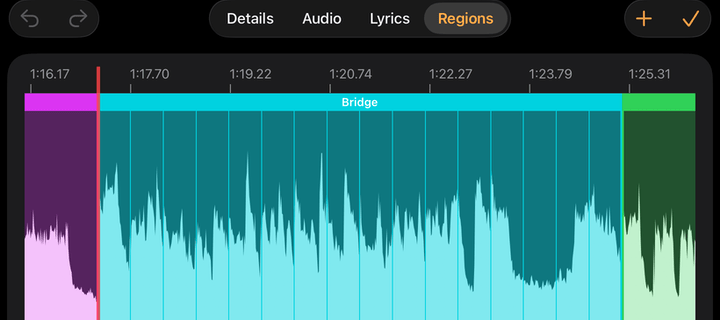
Stage Traxx 4: colour-coded audio regions you can loop, skip or extend; LRC-timed lyric scrolling; network sessions (site, regions image). ShowPulse: individual chord sheets per musician, chosen by the viewer (site). LivePrompter:
- One file shows different content per musician.
- One pedal drives it.
- The title bar changes colour with the state (ready, running, paused, finished).
- Scroll speed is set per section from timing markers (site).
DAW show modes.
- MainStage Perform: full screen, with big controls.
- Studio One Show Page: remaining run time plus the next song (pcaudiolabs).
- REAPER Stage-Dash: Previous / Current / Next region, a high-contrast mode, and locked by default so a stray touch can't move the transport (listing).
- SUPcosm Big Scene Names: current + next scene, very large.
- Spacebar Counter: a big bar.beat.sub readout, a segmented beat bar, and the background colour changes when loop is on (image).

Show timers. Ontime and Stagetimer.io are below under open source; they set the conventions for "confidence monitors". QLab shows GO / Standby / Notes, and the QRT browser view adds current and next cue plus time remaining.
Soundbrenner: a colour per beat, three vibration types (downbeat, offbeat, subdivision). Users asked for a downbeat-only flash (suggestion). forScore Cue: the leader turns pages, and Dual Page spreads one score across two iPads.
3.2 Open source and DIY
Ontime (GPL, browser views): repo, docs.
- The stage timer shows a big clock, now/next titles and a secondary line. That line is either an aux timer or a message pushed by the operator or by other software.
- Wrap-up colours change as time runs out.
- Every view option lives in the URL, with presets and aliases.
- Planned vs expected times.
- OSC, HTTP and WebSocket APIs, plus a Companion module.

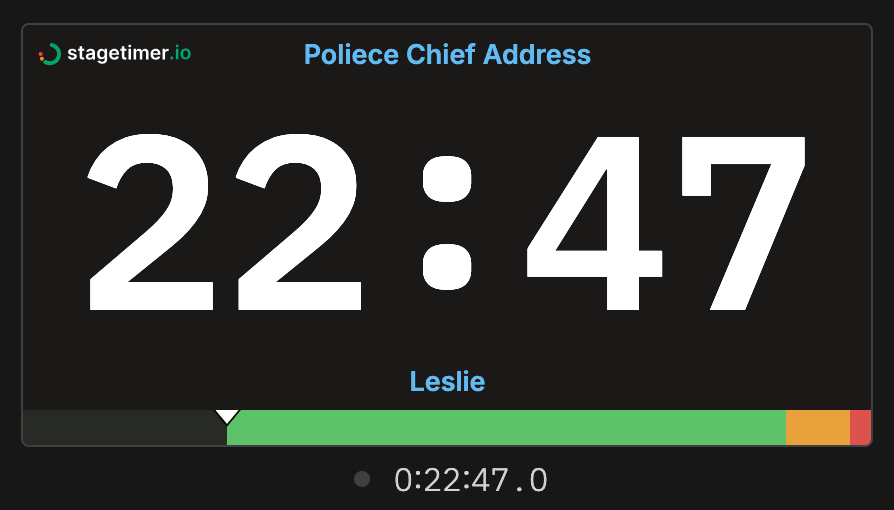
Stagetimer.io: features.
- Green → yellow → red colours, repeated on a progress bar for peripheral vision.
- A chime or flash at each threshold.
- Messages auto-fit the screen.
- Blackout.
- A connected-device list where the operator can flash one to identify it, force a reload, or disconnect it.
- A whole-show progress bar.

FreeShow: stage docs.
- A drag-and-drop stage layout editor. Chords are an optional overlay per text box.
- Devices pick a layout with
?name=Layoutin the URL and remember it. - The operator can "move all connected devices to" a layout.
OpenLP Stage View: manual.
- A row of verse tags (V1 C1 V2 …) next to the clock, the current one highlighted. This is the most compact song map we found.
- Custom stages are a folder of HTML, CSS and JS.
- Complaints: lag on slide change, and the next item overlapping the notes.
Quelea: users ask for chords to stay on via the URL (volunteers forget the toggle) and for a fixed text size, because auto-fit makes the text jump between slides (forum). The lesson is to fit text per song, not per slide.
DAW glue:
- OSC_Send M4L: sends the last locator plus quarter-notes to the next locator, which is the minimal countdown primitive.
- Ableton Stage Helper: lists bad locators in red before the show.
- LivePilot16: a three-card prev/current/next banner on a dark tablet HUD (preview).
- Open Stage Control: browser control surfaces.
- Bitfocus Companion: Stream Deck buttons used as mini status displays.

Visual metronomes:
- tapbox: an ESP32 with a seven-segment
display.
- The decimal point shows lock state: solid locked, blinking searching, off unlocked.
- It shows the Link peer count.
- It scrolls its IP at boot.
- web-band: visuals are scheduled at the audible time. Flash intensity and reduced motion are set per device.
- JVMetro: the whole window turns red when the transport stops or it isn't synced.
- LinkHut: shows phase within the quantum and the peer count.
- chordbook: band autoscroll.
- QPrompt: a reading-position line, time remaining, a start countdown.
Hardware:
- midilights: 24 px per beat, so one bar fills the strip. A planned phrase mode fills over 16 beats.
- A MIDIbox forum build re-anchors every downbeat so missed pulses self-correct.
- A Q-Logic review says to put the light off to the side for peripheral vision.
- Innerclock VCT: red LEDs that preserve night vision.
- DrumLite and its patent: colours chosen to survive stage lighting.
- Peterson BodyBeat Sync:
- It loads a whole-song tempo map from a MIDI file.
- Groups of devices sync wirelessly to one master.
- Output is audible, visual and tactile.
- It is close to our model, in hardware.
- Practitioners note that eyes are slower than ears and that LEDs read crisper than LCDs. Make the downbeat structurally different (position, size), not just brighter.
Accessibility research:
- MUSTEM: a vibrotactile wearable plus a visual dashboard, tested with deaf users.
- DanceVibe: a vibration wearable for deaf dancers.
- Tap-Tap: cue codes between blind musicians, sent by vibration.
4. Ideas from other fields
Type size for distance. Cap height to viewing distance:
| Use | Ratio | Basis |
|---|---|---|
| Glance in < 1 s (section, countdown, bar) | ~1:100 | ADA 703.5.5 adds 1/8" per foot ≈ 1:96 (table) |
| Read when you choose to look (lyrics, chords) | ~1:170 | 20–22 arcmin "assures legibility" (Activu, FAA HF) |
| Signage minimum, stopped reader | ~1:400 | studiomatrx |
Worked example. A 55" 1080p panel at 8 m:
- Glance text needs a cap height of about 126 px, which is a font size of about 180 px. Only five or six such lines fit on the screen.
- Lyric text needs a cap height of about 75 px.
At 1920×1080 our canvas has the same pixel budget, so this is a real constraint for DISP-Q1.
Typefaces.
- Clearview's research shows that on dark backgrounds, bright strokes bleed into the letters' counters (halation). Open counters and a slightly lighter weight than you'd use on white read further (TTI report).
- Barlow is in the DIN family, which is right for this.
- For numbers, use tabular figures (Share Tech Mono already is). Airbus's B612 Mono is built to keep 1/l/I, 0/O and 5/S distinct when blurred (Google Fonts).
Polarity.
- Dark text on light reads better in general.
- On stage, keep a dark background anyway: a white panel lights the band and dazzles dark-adapted eyes.
- Use off-black (#101010) and off-white (#E8E8E8), and avoid full-white flashes.
- Keep a high-luminance theme for daylight. F1 still uses pit boards partly because LEDs wash out in sun (Motorsport).
Colour vision.
- About 8% of men have a colour-vision deficiency, so a typical band probably has one.
- Okabe–Ito is a palette that stays distinct under all three common
deficiencies (reference):
- #E69F00 orange
- #56B4E9 sky blue
- #009E73 bluish green
- #F0E442 yellow
- #0072B2 blue
- #D55E00 vermillion
- #CC79A7 reddish purple
- Always pair colour with a second channel: a letter badge, a pattern or a position.
Peripheral vision.
- The periphery is poor at colour and detail but good at motion and changes in brightness.
- Yellow and orange survive about 30° off-axis better than green.
- Air traffic control uses blinking, not colour alone, for critical alerts (Imbert 2014).
- Cap flashing at about 3 Hz for photosensitivity safety.
Glance time. Racing gives a pit board about 1 s, so it uses fixed rows and shorthand: P3, L12, +1.4 (F1Technical). NHTSA limits glances to 2 s and rules out auto-scrolling text (SWOV). For us that means fixed positions that never move between songs, and lyrics that step line by line rather than scroll smoothly.
DJ software.
- Rekordbox phrase analysis draws song structure as coloured, labelled territory on the waveform. Its auto-labels are often wrong, so editing them must be easy.
- Engine DJ, Serato and Traktor show two time scales at once: a whole-track overview with a playhead, and a zoomed scrolling waveform past a fixed "now" line (Engine DJ guide).
- Traktor's beats-to-cue counter shows
-4.4.4, and DJs ask for it in other apps (Algoriddim request). - Jog LEDs blink slowly with 30 s left and fast with 15 s left.
Rhythm games.
- In a note highway, distance on screen is time to the note, which is read pre-attentively.
- Rock Band's Big Rock Ending transforms the whole lane for a special moment.
- Rocksmith was criticised because players couldn't see a section overview, so a highway alone isn't enough.
- osu! approach circles close onto the target, with a configurable lead of 450–1800 ms; too much lead clutters the screen (wiki).
- Beat Saber trades look-ahead against precision.
Karaoke. Show at most two lines: the current one and the next. The line appears about 1 s before its wipe starts (kbp2ass). The fill colour can show the part (lead, harmony, all).
Conductors.
- Each beat has its own position in the pattern (down, left, right, up), so the player knows the beat without counting.
- The preparatory beat one beat before an entry carries tempo and dynamics (Conductit).
Theatre cue lights.
- A cue goes through Warn → Standby → Go.
- Standby is a flashing light. The operator acknowledges it, and it goes steady.
- Green means go, and the word "go" is reserved for the moment of action (Theatrecrafts).
- The prompt book places the standby a known distance before each go.
Broadcast.
- Time calls get closer together as air time nears: 4, 3, 2, 1 min, 30 s, 15 s, then 10…1.
- Shot clocks switch to tenths of a second under 5 s, and a separate coloured light strip marks zero (Wikipedia).
- Countdown pedestrian signals helped drivers prepare rather than react late (Berkeley ITS).
Rocket launches, T- vs L-.
- The T- clock stops during planned holds. The L- clock is real time to launch and never stops (Wikipedia).
- For us: during an open vamp the countdown should visibly hold, not lie. A second counter can count bars in the vamp.
Flight decks.
- A fixed pointer over a moving tape.
- Bugs mark targets on the tape.
- A strict colour grammar: amber caution, red warning, magenta or cyan for selected targets (A320 PFD).
- NASA found that adding trend information cost secondary-task performance, so use it sparingly.
Progress bars. People tolerate slowness early in a progress bar but not near the end (Harrison, UIST 2007). For us, subdivide the last bar into beats so the end of a section reads precisely. Bar cells grouped in fours can be counted at a glance (subitised) rather than read.
5. StageDisplay today vs the research
Based on PROJECT.md §9 and §19 and the built-in layouts, as of 2026-10-10.
Already strong (matches or beats prior art)
- Song map: blocks sized by beats and coloured by section, with the current one boxed, the next dashed, the played part dimmed, a playhead, and a section progress bar with bar ticks. This is the AbleSet and DJ-overview pattern.
- Count-in digits in the last bar, the NEXT name flashing, and the beat columns with accents. The beat columns encode position, conductor-style.
- Hold and unreleased loop states shown explicitly (HOLD, SPACE TO MOVE ON, LOOP n). This addresses the "accidental loop" fear.
- Role filtering (
--role),dyn=/feel=/band=/lead=/harm=tags, andnote=. These cover the MD-notes-per-section idea. - Lyrics: karaoke (current line + next), all-lyrics with the current line
slid to 30% (as
[top+N]does), chords above words, and chord-only rows for sections with no words. This covers the bass/keys "chord-per-bar" ask through thechartwidget. - Phones run their own clock from timestamped state (
sync.md). This is exactly the "sync state, not pixels" lesson, and avoids BandHelper's 1–3 s lag. - Layouts and themes in JSON5 with a visual editor, several per display,
and a
daylighttheme. This matches ProPresenter, FreeShow and AbleSet Canvas. - Connected-screens list and host permission. Half of Stagetimer's device-management pattern.
Worth adding or changing (ranked by evidence × fit)
-
A bars-to-next countdown before the last bar. The current count-in only starts in the section's last bar, and NOW shows
bar NN / total. Musicians and DJs ask for "Chorus in 3 bars". Let the precision step up as the change approaches:in 8, thenin 4 bars, then the existing3·2·1beats- remaining shown as
bars | beats, to cover odd bars (the drummer's4 | 3) - optionally a row of bar cells grouped in fours, filling one per bar
-
Warn → standby → go for markers and section changes.
- Warn: the marker appears on the map or NEXT N bars ahead, set per cue or per role ("patch change: warn 4 bars early").
- Standby: amber card or border, slow pulse then fast pulse in the last 1–2 bars.
- Go: one reserved treatment, on the beat.
-
Colour grammar review. The downbeat flash is red. Theatre, cockpits and the colour research all reserve red for faults and stops; Soundbrenner says "If every mark is bright, nothing is bright." Options:
- tint the flash with the current section's colour (AbleSet), or with the next section's colour on the last beat before a change (the conductor's preparatory beat)
- keep red only for HOLD, STOP and lost sync
Also check the section palette against Okabe–Ito or a colour-vision simulator. Make sure every block has a text or letter badge, which it mostly does already.
-
MD → band messages with acknowledgement. The granted host (or the player) sends:
- a fixed vocabulary: REPEAT, WATCH ME, END, BUILD, DOWN, TO BRIDGE, VAMP
- free text, auto-fit, with time on screen scaled to length (OnSong: ⅓ s per word)
- optionally to one role or one screen
Phones can tap to acknowledge, and the player's H list shows who has seen it (the theatre "flashing → steady" loop). A "band ready" tick before a song falls out of the same mechanism. Five or more sources ask for this, and none of the products does all of it.
-
Queued jumps visible on every screen. When the host queues a section, show it on the map (target outlined, "→ BRIDGE at bar 8") and in NEXT. Add end after this section as a state. This is a known AbleSet gap.
-
Sync health on phones and stage displays.
- A small lock dot (tapbox): solid when locked, blinking while catching up, hollow when offline.
- A whole-screen "stale" treatment after N seconds without state (JVMetro turns the window red), so a frozen screen never looks live.
- A "follower" label on remote devices (Playback's orange banner).
-
Views configured in the URL.
?layout=,?theme=,?role=,?chords=numbers,?lyricsAhead=2(Ontime, FreeShow, Quelea). Each phone or TV then remembers its role from a bookmark, and the QR code could encode a role. Roles are currently not sent to phones (PROJECT.md §1 stage 4). -
Role presets as built-in layouts. We have stage, focus, lyrics, sheet, singers and strip. Make the role set explicit and name them by musician:
- Drums: map + big countdown + beat cells, longer look-ahead
- Vocals: karaoke-large + next-section first line + section name
- Keys/Bass: chart (chord per bar) + map
- MD: map + jump buttons + messages + set time
- Distance: three items, huge
-
Distance-driven sizing (DISP-Q1). Ask for the screen diagonal and the farthest player's distance. Derive the theme's text scale from the ratio table in §4, and warn when a layout's glance text is too small at that distance. Combine this with the planned live-checklist test: farthest distance, a 1-second glance test, a colour-vision simulation, and an off-axis check.
-
Vamp/hold honesty. In
holdor an unreleasedloop:- freeze the countdown visibly ("HOLD · vamp", hatched NEXT)
- add a small "bars in vamp" counter (the T- vs L- clock idea)
- keep the "loop is on" state as a background or border colour change, not just a tag
-
Between songs. An "Up Next" card with the song, key, capo, tempo, metre and a transition note (pad, segue, count-off by whom). The set clocks: remaining in song, remaining in set, and expected set end (AbleSet, Planning Center).
-
Lyrics refinements.
- Beat bubbles in instrumental gaps before the next vocal line (AbleSet).
- A per-viewer look-ahead offset in beats.
- The first line of the next section shown during the count-in. The
next-lyricswidget may already do this. - Step line by line rather than scrolling smoothly on far screens.
- Fill colour by part (lead, harmony, all) using
lead=andharm=.
-
Chord formats. Nashville numbers and Roman numerals as a per-view option, and capo shapes vs sounding chords (we have
capo:). ChartBuilder and ProPresenter both do this. -
Phone extras.
- Optional haptic beat on Android (
navigator.vibrate), with distinct patterns for the downbeat and for "change next bar". - Per-device flash intensity and reduced motion (web-band).
- Keep the screen awake.
- Lock by default so a stray tap can't move the transport (Stage-Dash).
- Optional haptic beat on Android (
-
A look-ahead lane (experimental). A horizontal "section highway" with a fixed now line about 25% from the left. Upcoming bars, section blocks and cue glyphs (stop, hit, key change, tacet, fill) scroll toward it. Add an optional osu!-style approach ring on hard hits. This is a DJ-waveform and Rock Band hybrid that no worship product has. It needs the distance-sizing work first, because it spends screen area.
-
External integrations. Expose section, next section, bars-to-next, tempo and colour as simple OSC or HTTP values, so Companion, Stream Deck and TouchOSC users can build their own small displays. Add an "identify" flash on a chosen screen from the H list (Stagetimer).
Layout sketches
All on the 1920×1080 canvas. Glance text is ~180 px. Everything else is secondary.
DRUMS / DISTANCE (pit-board rule: 4 fixed rows)
┌───────────────────────────────────────────────────────────┐
│ CHORUS 2                                     bar 6 / 8    │  ← section in its colour
│                                                           │
│        BRIDGE  in 3 bars         ▮▮▮▯  ▯▯▯▯               │  ← next in its colour + bar cells
│                                                           │
│   [ 1 ]  [ 2 ]  [ 3 ]  [ 4 ]                              │  ← beat cells, beat 1 larger
│ ▕I▕ V1 ▕ C ▕ V2 ▕ C2▕▓▓B▓▓▕ C ▕ O ▕   ← map, playhead     │
└───────────────────────────────────────────────────────────┘

VOCALS
┌───────────────────────────────────────────────────────────┐
│ VERSE 2 · lead: Sam                        → CHORUS in 2  │
│                                                           │
│   The line being sung, very large                         │
│   the next line, dimmer                                   │
│                                                           │
│ ● ● ● ●  (beat bubbles in gaps before the next entry)     │
│ ▕I▕ V1 ▕ C ▕ V2 ▕ C2 ▕ B ▕ C ▕ O ▕                        │
└───────────────────────────────────────────────────────────┘

LOOK-AHEAD LANE (experimental)
┌───────────────────────────────────────────────────────────┐
│ CHORUS 2   bar 6/8                    BRIDGE in 3 bars    │
│        │                                                  │
│ ───────┼──┬──┬──┬──╫━━━━ BRIDGE ━━━━━━━┬──⊗STOP──┬──      │
│   now ▲│  6  7  8  ║1  2  3  4  5  6  7│8        │        │
│ ▕I▕ V1 ▕ C ▕ V2 ▕ C2 ▕ B ▕ C ▕ O ▕   (whole-song map)     │
└───────────────────────────────────────────────────────────┘
6. Where to look next
- A manual Reddit pass (r/worshipleaders, r/WorshipTech, r/drums, r/livesound) and the AbleSet Discord, to check items 1, 4 and 7 of §2.
- AbleSet's demo videos and Life.Church's stage layouts are the best visuals
to look at side by side with our
--shotoutput. - The live checklist's distance test (DISP-Q1) should use the ratios in §4.